

Salon booking software is an online system that takes appointments without phone calls. A client picks a service and a time on your website or booking link, and the software handles the rest: confirmation, reminders, the calendar, the client record, and payment at checkout.
Most owners shop for the booking button and miss the chain behind it. The button is the easy part. The value is everything that happens between the click and the payment clearing, and that chain is what this guide walks through, step by step, the way it actually runs in a working salon.
How clients book online
Clients book through a link on your website, Google profile, or Instagram. They pick a service, see only the times that are genuinely free, enter their name and phone number, and get a confirmation on the spot. Start to finish, it takes under a minute.

In the salons I work with, most of these bookings land after hours. A client decides at 10 PM that she needs a cut, books from the couch, and shows up Thursday. Without online booking, that appointment goes to whichever competitor answered their messages first.
The key detail is the calendar behind the link. It shows real availability, pulled from each stylist’s actual schedule, so two clients can never grab the same slot. That is the difference between a booking page and a contact form. Behind that page sits your service menu the way you configured it: how long each service takes, the buffer between appointments, and which staff offer what. A color service that needs two hours and a specific stylist simply never shows a 30-minute gap on a junior’s column. Our online booking feature shows how the client side is set up, and this breakdown of online booking covers what it does to a full calendar.
What happens the second a booking lands
The moment a client confirms, five things update at once. The client gets a confirmation text and email, the time slot closes across every channel, the stylist’s schedule gains the appointment, a client record opens or updates itself, and the first reminder gets scheduled.

Nobody types anything. That is the part that still surprises owners who grew up on a paper book or a shared calendar. I have watched front desks go from spending the first hour of every day retyping the book to simply glancing at a screen that is already correct.
If a client books with a specific stylist, the appointment lands on that stylist’s column. If they book first available, the system assigns it by your rules. Either way, the rest of the team sees the day fill in real time. For salons where speed matters, express booking trims the flow down even further.
Reminders that cut no-shows
The software sends automatic reminders before every appointment, usually a text 48 hours out and another a few hours before. The client taps to confirm or reschedule, and the calendar adjusts itself.

No-shows are a staffing problem as much as a revenue problem. An empty chair at 2 PM still costs you the stylist’s hour. In my experience, salons that run two automatic reminders see far fewer gaps than salons that rely on the client remembering, and the clients prefer it. Nobody likes a phone call from a salon. Everybody reads a text.
The good systems are two-way. A client replies that they need to reschedule and gets the open times without calling you. A client who ghosts still gets a polite follow-up asking if they want to rebook, which recovers visits you would otherwise never hear about. Automated flows handle this messaging, and this guide to client messaging shows the sequences that work.
Timing matters more than most owners expect. A reminder sent a week out gets forgotten; one sent an hour before leaves no room to fill the gap. The pattern I see work best is a confirmation request two days before and a short heads-up the morning of. The first catches the planners, the second catches everyone else, and either reply updates the book without your involvement.
Client records update on their own
Every booking feeds the client’s profile automatically. Contact details, visit history, services received, formulas, allergies, and notes all land in one record that any stylist can open.

This is the quiet superpower of the whole system. A new stylist opens the profile and knows the client has been coming for two years, gets a root touch-up every six weeks, and reacts badly to a certain toner. That knowledge used to live in one person’s head. Now it lives in the business.
It also powers everything downstream. Marketing pulls from these profiles, reports count from them, and rebooking reminders reference the actual last visit. Client management is where this lives in PandaCue.
Payment and checkout
Checkout runs through the same system as the booking. The ticket pulls the services straight from the appointment, the client pays by card, cash, or gift card, and the payment attaches to the client record with the visit.
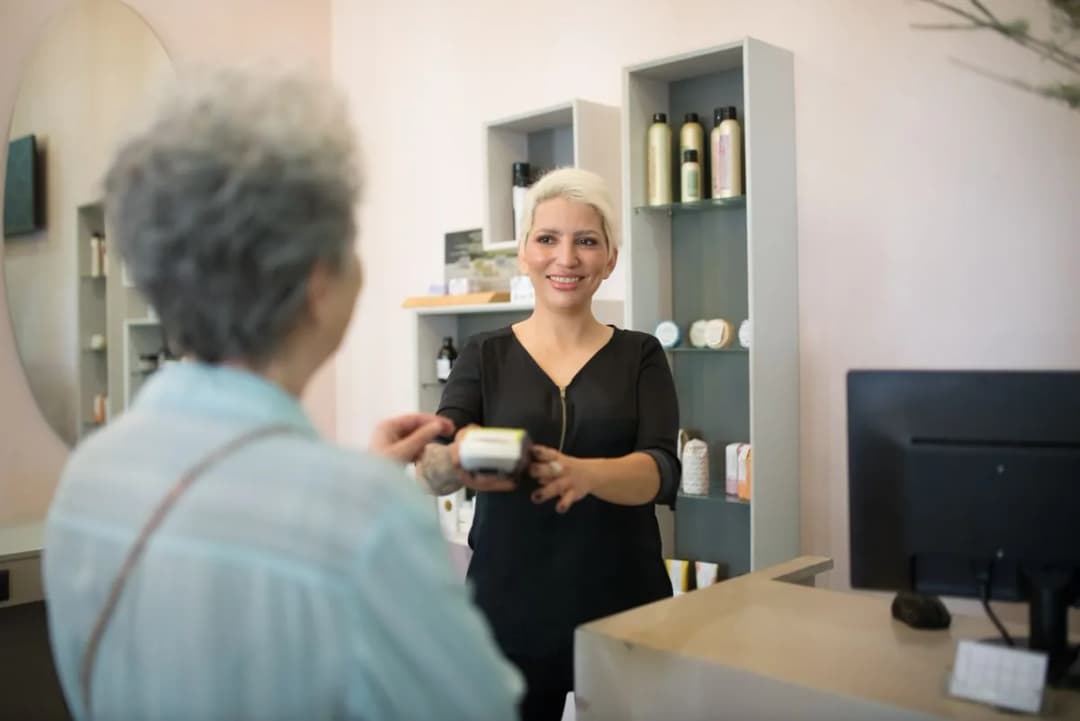
The old setup splits this across two worlds. The appointment lives in one app, the money moves through a separate terminal, and somebody reconciles them at close. Built-in checkout removes the seam. The ticket is already correct because the appointment was correct, tips and splits calculate from the real total, and the end-of-day numbers match the calendar without detective work.
Card on file is the detail worth asking about. When a client saves a card at booking, checkout takes seconds, deposits become possible, and no-show policies actually hold. Payments in PandaCue covers the setup, and this POS walkthrough shows a real checkout.
Deposits deserve their own thought. For high-value services like color corrections or bridal parties, taking a deposit at booking changes client behavior completely. The software holds the card or charges a fixed amount when the appointment is made, states the cancellation window in the confirmation, and applies the deposit to the final ticket automatically. Salons that do this stop having conversations about no-show fees, because the policy enforces itself.
The full loop, booking to payment
Put together, one appointment moves through six stages with no manual steps between them: booking, confirmation, reminders, the visit itself, checkout, and the updated record.

Trace a single client through it. She books a cut and color online at 10 PM. Confirmation lands instantly. Reminders go out at 48 hours and 2 hours. She walks in, the stylist reads her profile, does the service, and rings up the ticket from the appointment. She pays, the record updates, and a rebooking nudge goes out six weeks later based on her actual cycle.
That loop is the product. The booking button is just the front door. If you are weighing booking-only tools against full platforms, our booking vs management comparison draws the line, and the management software guide covers the wider system.
Now consider the same loop with disconnected tools. The booking lives in one app, reminders come from another, the client list sits in a spreadsheet, and payment runs through a terminal that knows nothing about any of it. Every handoff between those tools is a place where details get lost: the reminder that went to an old number, the formula that stayed in a notebook, the ticket that never matched the appointment. One system is not about convenience. It is about removing the gaps where a salon quietly leaks money.
What to test before you commit
Trial the software the way your salon actually works, not the way the demo wants you to. Five tests tell you almost everything.
First, book like a client from your own phone, on your own site. If anything confuses you, it will confuse them. Second, abuse the calendar: double-book, drag appointments, cancel one, and watch whether staff schedules and client messages keep up.
Third, trigger the reminders with a test appointment for tomorrow and read what actually arrives. Fourth, run a full checkout with a card, a tip, and a retail product, then open the client record and confirm the visit, payment, and notes are all there. If a vendor’s trial makes any of this hard, that is your answer.
Fifth, test the move-in. Import a slice of your real client list and a week of future appointments, then check what survived: phone numbers, notes, recurring bookings. This is where cheap tools fall apart and where your trial earns its keep. A system that cannot take in your existing book cleanly will cost you more in retyping than you save on the subscription. Day-to-day messaging questions are covered in the one-inbox guide, and plans are on the pricing page.
Frequently asked questions
Does salon booking software take payments, or do I need a separate terminal?
Most modern platforms include checkout, so the ticket pulls from the appointment and the client pays in the same system. A separate terminal still works, but you lose the automatic record-keeping.
Can clients book when the salon is closed?
Yes, and that is most of the point. The booking page reads live availability around the clock, so the 10 PM bookers land on tomorrow’s calendar without anyone answering a phone.
What happens when a client no-shows?
The appointment stays on the record as a no-show, which the system can use for policies like deposits or card-on-file requirements. Most platforms also send an automatic rebooking message so the visit is not lost entirely.
Does it work with my existing website?
Nearly always. You add a booking button or embed the booking page, and it opens your live calendar. No rebuild required.
Do clients need to download an app to book?
No. Booking runs in the phone’s browser from a link, the same way ordering food does. Some platforms offer a client app as an extra, but it should never be required.
How long does setup take?
A basic setup with services, prices, and staff hours goes up fast. In my experience the part that takes time is the data: importing your client list and future appointments cleanly. Start your trial with real data, not the demo sample. Start a free trial here.
The short version
Salon booking software moves the appointment book online, then automates everything attached to it: confirmations, reminders, records, and checkout. Judge it on the full chain, not the booking button, and trial it with your real services and real clients.
Last verified: October 15, 2026.