

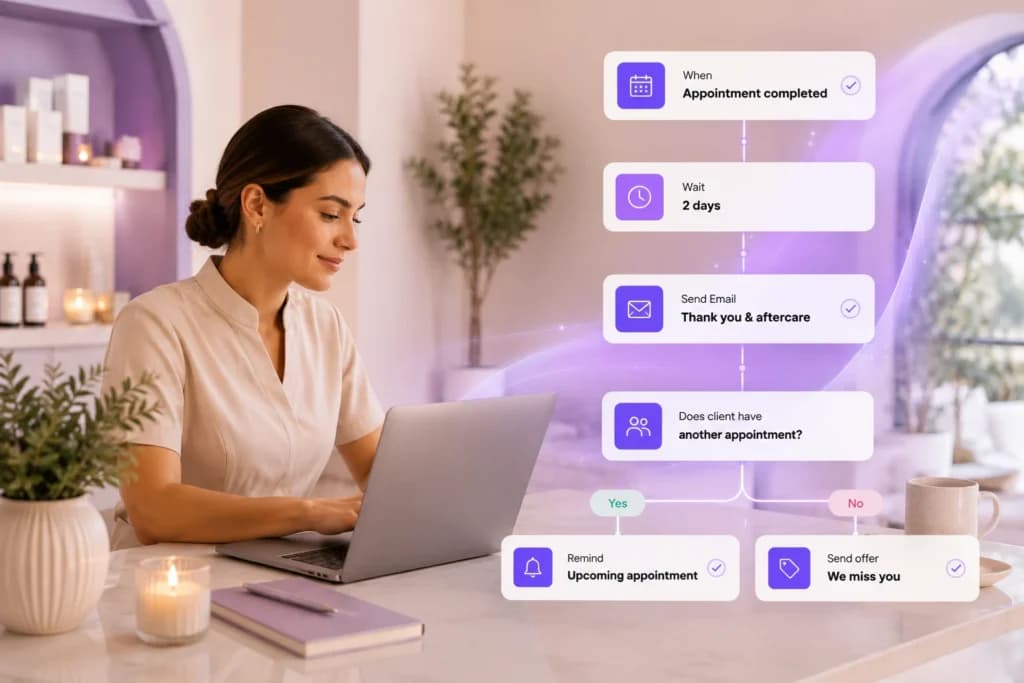
Automated Flows are PandaCue’s tool for sending the right message to the right client at the right time, without anyone on your team typing it out.
A flow watches for something that happens in your business. A client books an appointment. A membership is about to expire.
Someone hasn’t visited in 60 days.
When that event happens, PandaCue sends a text or email automatically, based on rules you set once.
You build the flow one time. It runs every day after that, for every client who matches.
Why Spas Need More Than Manual Reminders
Most front desks already send messages by hand. A birthday text here. A “we miss you” email there. It works fine when you have 50 clients.
It falls apart at 500.

Here’s the problem. Every manual message is a message someone has to remember to send. Busy days mean it gets skipped.
New staff don’t know the routine.
Clients slip through, and some of them never come back.
Salons, spas, and med spas run on repeat visits. A membership renewal missed by three days, a rebooking reminder that never went out, a review request that got forgotten each one is a small leak.
Automated Flows plug those leaks by making sure the message goes out whether anyone remembers or not.
How Automated Flows Work
A flow has four parts. Once you understand them, you can build almost anything.

Triggers
A trigger is the event that starts the flow. Common triggers include a completed appointment, a new client signup, a canceled membership, a form submission, or a specific date like a birthday.
Conditions and Filters
Conditions narrow down who the flow applies to. You might only want a flow to run for clients who booked a specific service, or clients who haven’t visited in 90 days.
Filters keep the message relevant instead of blasting everyone with the same text.
Delays and Timing
Timing matters as much as the message itself. A post-treatment care text sent two hours after a facial lands differently than one sent two days later.
Flows let you set exact delays, so each message arrives when it’s actually useful.
Actions
The action is what happens once the trigger fires and the conditions are met.
Usually that’s a text or email, but it can also be an internal alert to your staff, like notifying the front desk when a high-value client books.
What You Can Automate With Flows

- Rebooking reminders sent a set number of days after a client’s last visit
- Pre-care and aftercare instructions tied to specific services, like chemical peels or injectables
- Review requests sent a day or two after checkout, while the experience is fresh
- Birthday and anniversary offers that go out without anyone checking a calendar
- Membership renewal reminders before a plan expires or a payment fails
- Waitlist and cancellation alerts letting clients know when a slot opens up
- Internal staff notifications when a form is submitted or a big sale closes
Each of these can run as its own flow, with its own trigger, timing, and message.
A Flow in Action: A Simple Example
Picture a mid-size day spa with three locations. Their front desk used to track lapsed clients on a spreadsheet, calling anyone who hadn’t booked in two months.

The list grew faster than they could work through it, and most calls went to voicemail.
They set up a single flow instead. Trigger: no visit in 60 days. Condition: client has an active phone number and hasn’t opted out of texts.
Action: a text offering a small discount on their next booking, sent automatically every Monday.
Within a few weeks, a steady trickle of lapsed clients started rebooking on their own, straight from the text. No calls, no spreadsheet, no one had to remember to run the list.
This is an illustrative example of how a flow typically works, not a specific customer result.
How to Build Your First Flow in PandaCue
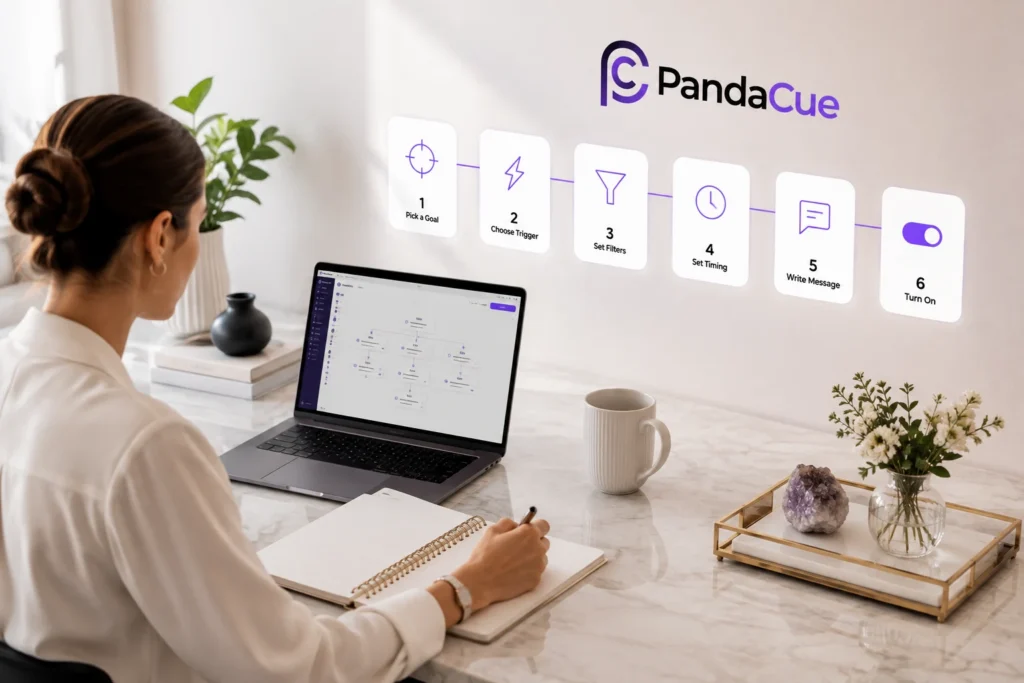
- Pick one goal. Start with a single outcome, like getting more reviews or reducing no-shows on rebooking.
- Choose the trigger. Decide what event should start the flow, such as a completed appointment.
- Set your filters. Narrow the audience so the message only reaches clients it applies to.
- Set the timing. Decide how long after the trigger the message should send.
- Write the message. Keep it short, specific, and written the way you’d actually talk to a client.
- Turn it on and watch it for a week. Check open rates and replies, then adjust.
Most salons start with one or two flows, like rebooking reminders and review requests, before adding more.
FAQs
Do I need technical skills to build a flow?
No. Flows are built with simple trigger-and-action rules inside PandaCue, no code required.
Can I use flows for both texts and emails?
Yes. Each flow can send a text, an email, or both, depending on what the client has opted into.
Will clients get too many automated messages?
Only if you let multiple flows overlap without filters. Setting conditions on each flow keeps messaging spaced out.
Can flows notify my staff instead of clients?
Yes. Flows can send internal alerts, like notifying the front desk when a form is submitted or a big sale closes.
Do flows work across multiple locations?
Yes. You can run one flow across all locations or build separate flows per location if pricing or services differ.
What happens if a client opts out of texts?
PandaCue respects opt-outs automatically. Any client who unsubscribes stops receiving flow messages by text right away.
Getting Started
You don’t need every flow running on day one. Pick the one gap that costs you the most, whether that’s lapsed clients, missed reviews, or slow membership renewals, and build a single flow to close it.
Automated Flows connect to your scheduling, memberships, and online booking data automatically, so once it’s built, it keeps working without anyone checking on it.
From there, add one flow at a time as you see what your clients respond to.