
A Salon calendar is the busiest part of the business. Injectors, estheticians, and nurses all need different time slots, different rooms, and sometimes different equipment. One overbooked hour can throw off an entire day.
PandaCue’s Calendar & Scheduling feature gives your front desk one screen that shows every provider, every room, and every appointment in real time.
No more flipping between spreadsheets or texting a manager to check if a room is free.
Why Scheduling Is the Backbone of a Spa
Every other part of your clinic depends on the calendar. Marketing drives people to book. Payments happen after the appointment. Client records get updated during the visit.
If the schedule is wrong, everything downstream gets wrong too.
Spas have it harder than most clinics. A single provider might offer Botox, filler, and a facial, each needing a different amount of time and a different room setup.
A front desk person juggling this by hand will eventually make a mistake. It’s not a skill problem. It’s a math problem, and there are too many moving parts for one person to track in their head.
Common Scheduling Problems Salon Run Into
Most clinics don’t realize how much time they lose to a weak calendar system until they switch to a better one. Here are the patterns that show up again and again.
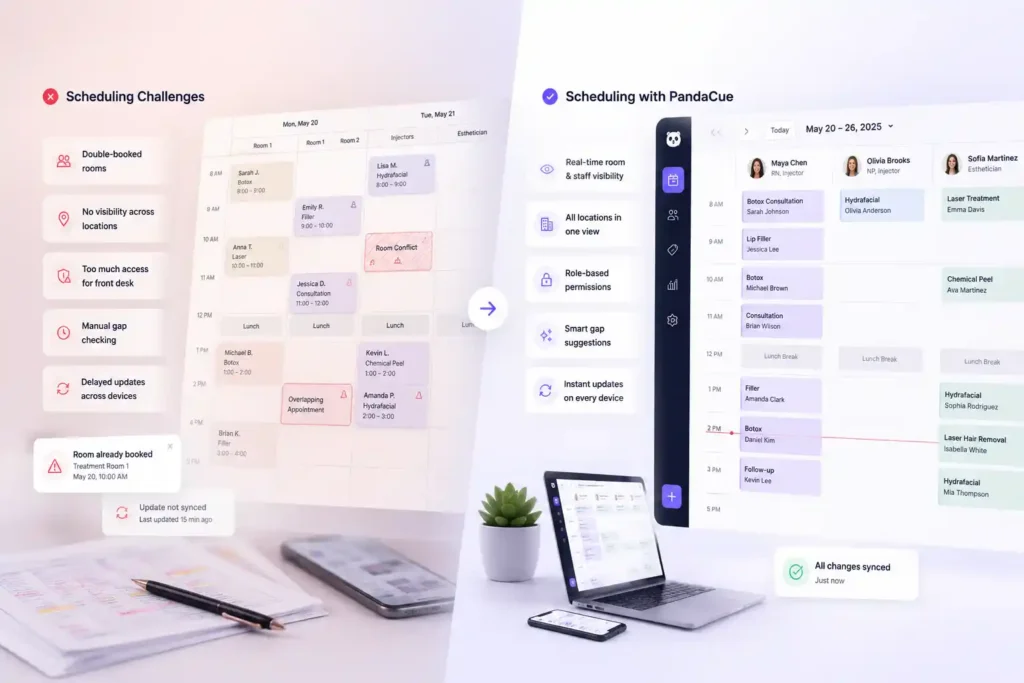
Double-booked rooms
Two providers get scheduled for the same treatment room at the same time because the booking tool only tracks staff, not spaces.
No visibility across locations
A manager running two or three sites has to call each front desk separately to check availability instead of seeing it all at once.
Front desk staff with too much access
Without role permissions, a receptionist can accidentally cancel or reschedule an appointment that only a manager should touch.
Manual gap-checking
Staff scroll through a long daily list instead of glancing at a color-coded view that shows open slots instantly.
Delayed updates
One staff member reschedules a client, but another employee working from a different device doesn’t see the change until minutes later.
What PandaCue’s Calendar & Scheduling Feature Actually Does
Here’s a plain breakdown of what’s inside the feature and why each part solves a real problem.
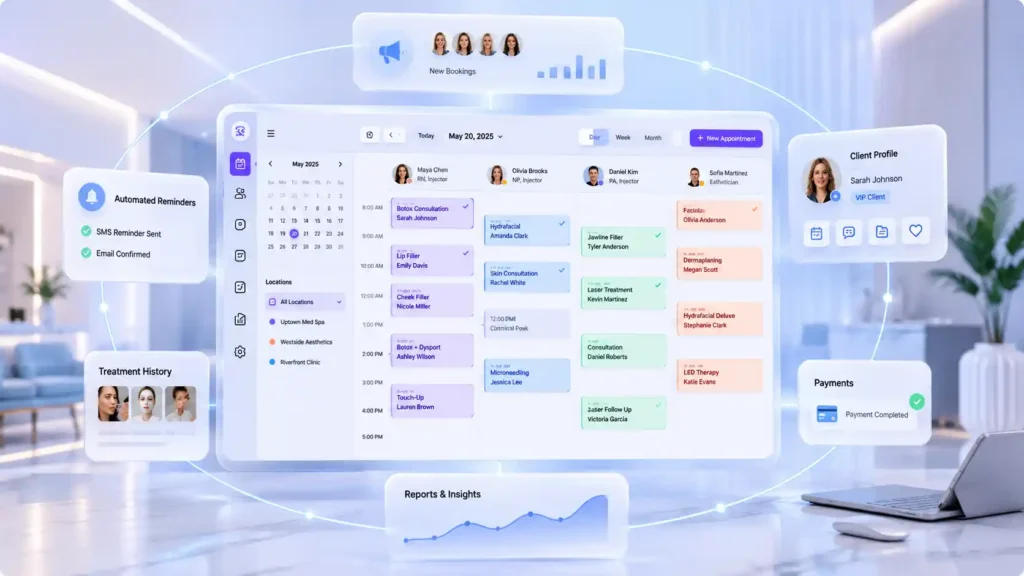
Multi-Staff Views
You see every provider’s schedule side by side on one calendar. If your medical director, two injectors, and an esthetician all work the same day, you can scan across their columns instead of opening separate calendars for each person.
Drag-and-Drop Editing
Need to move a client from 2 PM to 3 PM? Drag the appointment to its new slot. The system updates automatically, no retyping, no double entry, no risk of accidentally deleting the appointment while rebuilding it.
Color Coding
Assign a color to each service, provider, or appointment status. Glance at the day and you’ll instantly know which slots are consultations, which are injectables, and which are still unconfirmed. Your eyes do the sorting instead of your brain.
Resource Management
Rooms and equipment get tracked the same way staff do. If you only have one laser machine, the calendar won’t let two providers book it at the same time. This alone prevents a huge share of the double-booking headaches salon & spas deal with.
Block and Hold Times
Staff meetings, lunch breaks, and prep time between injectable appointments can be blocked with one click. This keeps front desk staff from accidentally booking a client into time that was never actually available.
Real-Time Sync
Every change appears instantly, on every device, for every logged-in staff member. If someone at the front desk reschedules a client, the provider’s tablet in the treatment room updates immediately. Nobody works off stale information.
How Multi-Location Salons Use This Day to Day
A manager overseeing more than one location can filter the calendar by site, staff, or service type and switch between daily, weekly, and monthly views without leaving the screen.
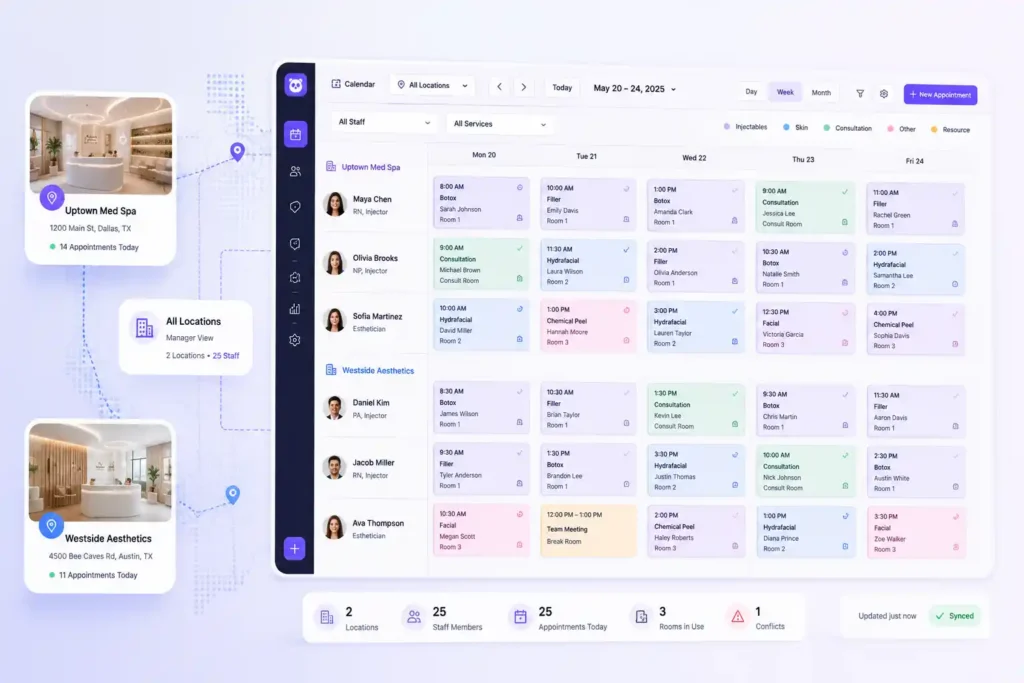
Instead of calling each location to ask “who’s free at 2 PM,” the answer is already on screen.
Role-based permissions matter here too. A manager can let front desk staff book and reschedule appointments while keeping cancellations or refunds restricted to admin accounts.
This isn’t about limiting your team. It’s about giving each person exactly the access their job requires, so mistakes don’t slip through during a busy afternoon.
A Realistic Example
Picture a spa with two locations and six providers. Before switching systems, the front desk kept a shared spreadsheet updated by hand.
A nurse injector in one location got double-booked with a client and a staff meeting because the spreadsheet hadn’t been refreshed in twenty minutes.
After moving to a calendar system with real-time sync and resource tracking, that kind of conflict stopped happening.
The front desk could see every provider, every room, and every hold time on one screen, updated the second something changed.
The result wasn’t more bookings. It was fewer wasted ones.
Step-by-Step: Setting Up a Calendar That Actually Works
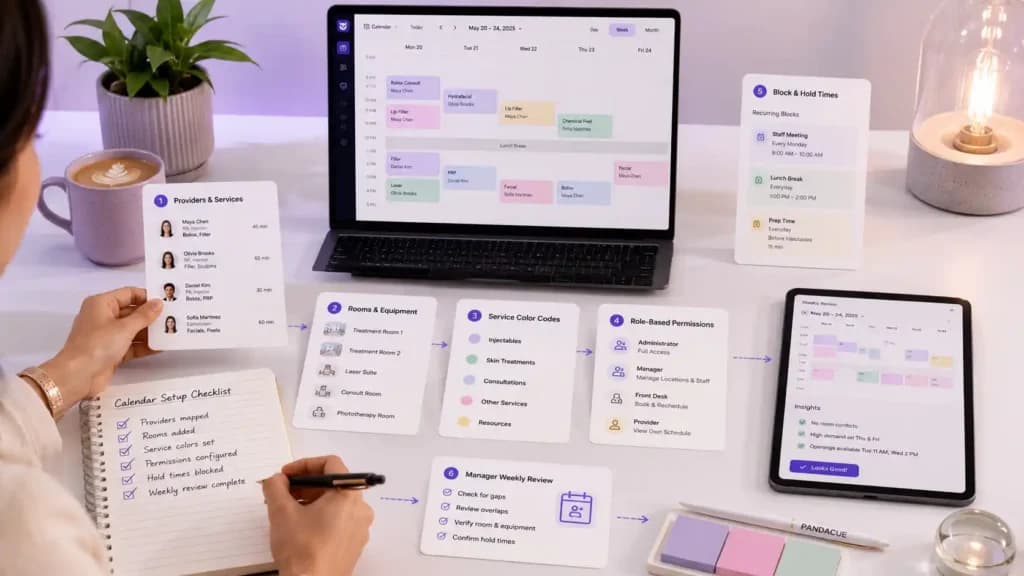
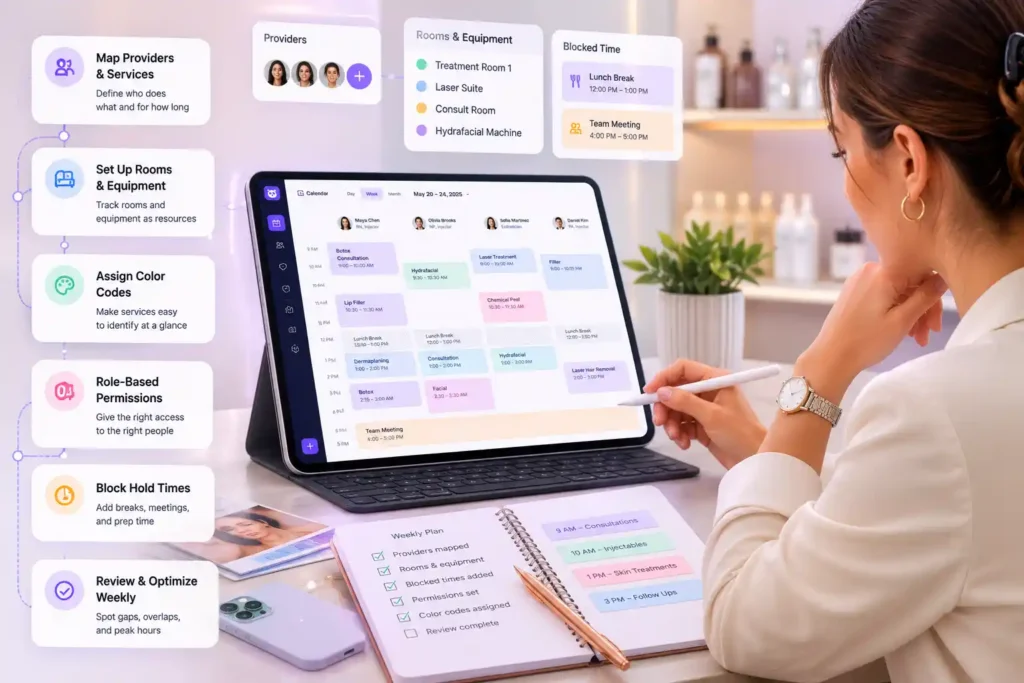
- Map your providers and their services. List who performs what, and how long each service takes, including buffer time for cleanup or notes.
- Set up your rooms and equipment as resources. Anything that can only be used by one person at a time should be tracked, not just staff.
- Assign color codes by service type. Keep it simple. Injectables, facials, and consultations are usually enough categories to start.
- Build role-based permissions. Decide who can book, who can reschedule, and who can cancel before your team starts using the system daily.
- Block recurring hold times. Add staff meetings, lunch breaks, and prep windows so they can’t be booked over by accident.
- Review the week from the manager view. Look for gaps, overlaps, and peak hours before they cause a problem, not after.
FAQs
What’s the difference between a calendar tool and full scheduling software?
A basic calendar just shows appointments. Scheduling software also tracks staff permissions, rooms, equipment, and real-time changes across every device your team uses.
Can front desk staff be limited to only booking, not canceling?
Yes. Role-based permissions let you decide exactly what each staff member can do, so front desk teams can book and confirm without touching cancellations or refunds.
How does multi-location scheduling work?
You can filter the calendar by location, staff, or service type, and switch between day, week, and month views without opening separate systems for each site.
Does the calendar prevent double-booking a treatment room?
Yes. Rooms and equipment are tracked as resources, so the system blocks a second booking for a space or machine that’s already in use.
What happens if two staff members edit the schedule at the same time?
Changes sync in real time across every device, so everyone sees the same updated calendar within seconds, no matter who made the edit or where they’re working from.
Is this only useful for large Salon & spas?
No. Even a single-provider clinic benefits from color coding and hold times. The bigger the team, the more valuable multi-staff views and permissions become, but the core features help clinics of any size.
Practical Advice Before You Switch Systems
Don’t just look at how a calendar looks. Test how it handles your busiest day. Book overlapping appointments on purpose during a demo and see if the system catches the conflict before you do.
That’s the real test of whether a scheduling tool will hold up once your front desk is under pressure.
If your clinic is still juggling a spreadsheet, a paper book, and a separate booking widget, moving everything into one calendar and scheduling system tends to save the most time in the first two weeks, simply because staff stop re-checking three different places before confirming an appointment.
Ready to see it running with your own staff and services?
Book a live demo or try PandaCue free for 7 days